< Back to all articles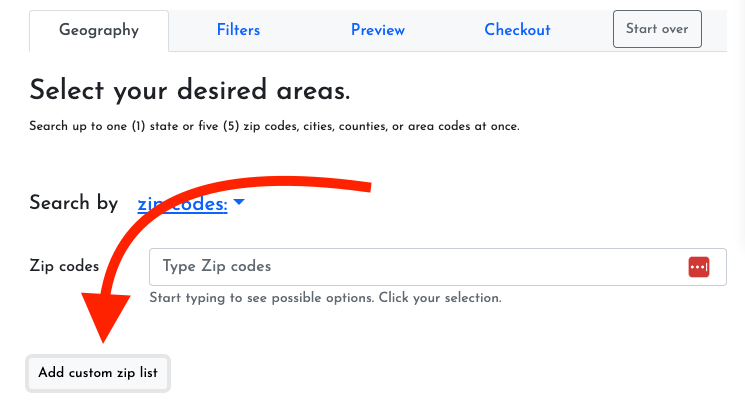
Create a List on ListShack
Searching for leads and creating a marketing list is a snap with ListShack. Watch our step by step video and follow along with step by step instructions below.
Before you get started
Step By-Step-Instructions
- Click "Search Consumers"
- Click on a geography region, such as Zip Codes. Start typing a zip code (city, state, or count). Click a suggestion to add the Geography region to your search filters.
- Click "Pick Filters" and add the appropriate filters to your search. There are many filters, but a few that you should be aware of
- Age, Income, Homeowner status are the most commonly used filters
- Unique Phone Records Only - ensures that you only get one phone record and will remove husband and wife phone numbers, for example.
- One Record Per Address - in some cases husbands and wives and their children living in the same household will have different phone numbers, use this filter to ensure that you only get one record per address (useful if you send mailers, for example).
- Exclude historical records - this filter will remove duplicates of the same record, for example if someone's phone number or address changed, it will ensure you only get the most recent record for the individual
- Click Preview Leads to view a sample of the records that will be added to your list.
- Click Checkout. Add a Search Name and the number records you'd like included in your list. Click Create List or Create CSV to create your list.
- Create List will add the leads to a list on ListCrm, so you easily view, keep notes, and export your list right in your browser.
- Create CSV will add the leads to a CSV (spreadsheet) file that you can download to your computer and open with a program such as Excel or Google Sheets.
Add and Manage Team Members
Add and manage team members and sub accounts to your ListShack account.
Read
Find and Remove Duplicates from Lists using ListCRM
We're so excited to announce that you can find and remove duplicates from your lists in ListCRM
ReadHow to upload data to ListCRM
Upload data from any CSV file to ListCRM by clicking the "Upload" button on the top of the page from any list. Don't have a list? Create a new one.
Read